Entering Transmitter (TCC) Information


General Information on 1042-S Transmitter Data
  1. If the user already has a TCC for 1099 filing, they will need an additional TCC for e-filing 1042-S.

  2. The TCC for form 1042-S always begins with "22" and may not be used for regular 1099 series e-Filing.

  3. Remember, the 1042-S e-Filing must be done by March 15th, not March 31.

  4. If the user has multiple 1042-S companies, they only need one TCC for 1042-S forms, see below.

Instruction on Entering Transmitter Data
To enter the transmitter information, select the Transmitter button found on the bottom left of the program's window,
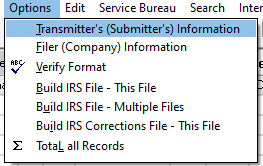
or select the Options menu and click Transmitter's (Submitter's) Information from the dropdown list.
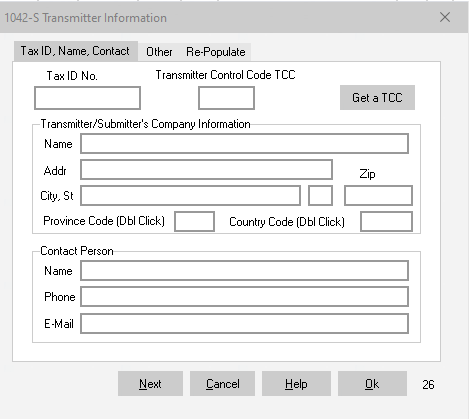
TCC Window
Enter all required information in the Transmitter Window, then click OK to save the data.
Transmitter Data Window

Obtaining a Transmitter Control Code (TCC)


The IR Application will need to be filled out in order to obtain a Transmitter Control Code (TCC) to e-File through the IRS FIRE site.
  • The Transmitter is the person or firm who is authorized to send a electronic file to the IRS via internet.

  • For futher information on the IR Application and the ID.me process, please refer to the link provided: 1099Express.com/Annual Warning

  • Paper filers are not required to obtain a TCC. The trasmitter may, or may not be, the Filer. For example, the transmitter might be a CPA firm who transmits for several client companies.

  • If the user has multiple 1042-S companies that need to be filed, they do not require multiple TCC's. Do not obtain a TCC for each company.

  • The TCC can be used this year and subsequent years. As long as the user complies to the IRS's IR application requirments.

Also see: Contacting Us or the IRS


Return to Data Entry ↪
Return to e-Filing Help ↪